Tutorial 2: 1D CANN: ROI Bump Fitting Tutorial
Objective: Extract the bump center position, width, and amplitude from ROI time series using the 1D CANN bump fitting module, and generate trajectory visualizations.
Background: EPG ring attractor encoding in the Drosophila Central Complex (Kim et al., Science 2017 [35]).
.. note:: For more details on the experimental context of ROI bump fitting, see :cite:p:`Kim2017RingAttractor`.0. Background and Method Overview
This tutorial focuses on neural population activity in a one-dimensional Continuous Attractor Neural Network (1D CANN), with the primary goal of tracking the bump’s:
Position (center)
Height (amplitude)
Width (width)
These time-varying parameters reflect the dynamic evolution of the bump within the ring-shaped network.
0.1 Data Source and Structure
This example is based on the EPG ring-attractor calcium imaging data from the Drosophila Central Complex:
Data type: Calcium imaging ROI fluorescence intensity (16 ROIs)
Reference: Kim et al., Science, 2017
Intuitive interpretation: Each ROI corresponds to a position on the ring, and the activity bump moves around the ring
This tutorial uses the sample data provided by load_roi_data; you may also substitute your own ROI matrix.
0.2 Analysis Workflow Overview
Load ROI data (
T × N)Fit bump parameters via MCMC
Obtain
center / amplitude / widthfor each frameVisualize bump trajectory over time (static or animated)
0.3 Output Structure and Interpretation
roi_bump_fits returns four core objects:
bumps: bump objects fitted for each framefits: sequence of(time, pos, amplitude, kappa)nbump: number of bumps per frame and the reconstructed signalcentrbump: centered bump curves (for visualization)
How to interpret:
pos: center position (phase) of the bump on the ringamplitude: peak intensity of the bumpkappa: bump width (larger values indicate narrower bumps)
1. Data Preparation
This example uses load_roi_data to load sample data for 16 ROIs.
You can replace it with your own ROI time series matrix (shape (T, N)).
[1]:
from canns.data.loaders import load_roi_data

roi_data = load_roi_data()
print(roi_data.shape)
Loaded ROI data: shape (4957, 16)
(4957, 16)
1.1 Preprocessing Recommendations
It is recommended to smooth/normalize the ROI signal first (this can improve fitting stability).
If NaN/missing values are present, perform interpolation or removal first.
The number of ROIs must match
n_roi.
2. Bump Fitting
Use roi_bump_fits to perform MCMC fitting, outputting:
fits: bump parameters for each framenbump: number of bumps per framecentrbump: centered bump curves
[2]:
import numpy as np
from canns.analyzer import data

cfg = data.BumpFitsConfig(
    n_steps=5000,
    n_roi=16,
    random_seed=42,
)

bumps, fits, nbump, centrbump = data.roi_bump_fits(roi_data, config=cfg)

print(f"frames: {len(fits)}")
print(f"avg bumps per frame: {np.mean(nbump):.2f}")
Initial likelihood: -66502.15
Using Numba acceleration (n_roi=16, parallel=No)
MCMC fitting: 100%|██████████| 5000/5000 [01:37<00:00, 51.11it/s, Log-Likelihood=-14214.64]
frames: 3161
avg bumps per frame: 137.84
3. Generate Animation
Use create_1d_bump_animation to generate the bump trajectory animation.
[6]:
anim_cfg = data.CANN1DPlotConfig.for_bump_animation(
    show=True,
    # save_path="bump_analysis_demo.mp4",
    nframes=60,
    fps=30,
    title="1D CANN Bump Analysis",
)

data.create_1d_bump_animation(
    fits_data=fits,
    config=anim_cfg,
)
Parameter Recommendations
n_steps: Number of MCMC iterations (larger values yield more stable results but are slower)n_roi: Number of ROIs (default: 16)n_bump_max: Maximum number of bumps per framesigma_diff/ampli_min/kappa_mean: Control bump shape
Performance Tips:
Fitting will be significantly accelerated if
numbais installedFor long datasets, use a smaller
n_stepsinitially to quickly verify trends, then gradually increase it
Visualization Example
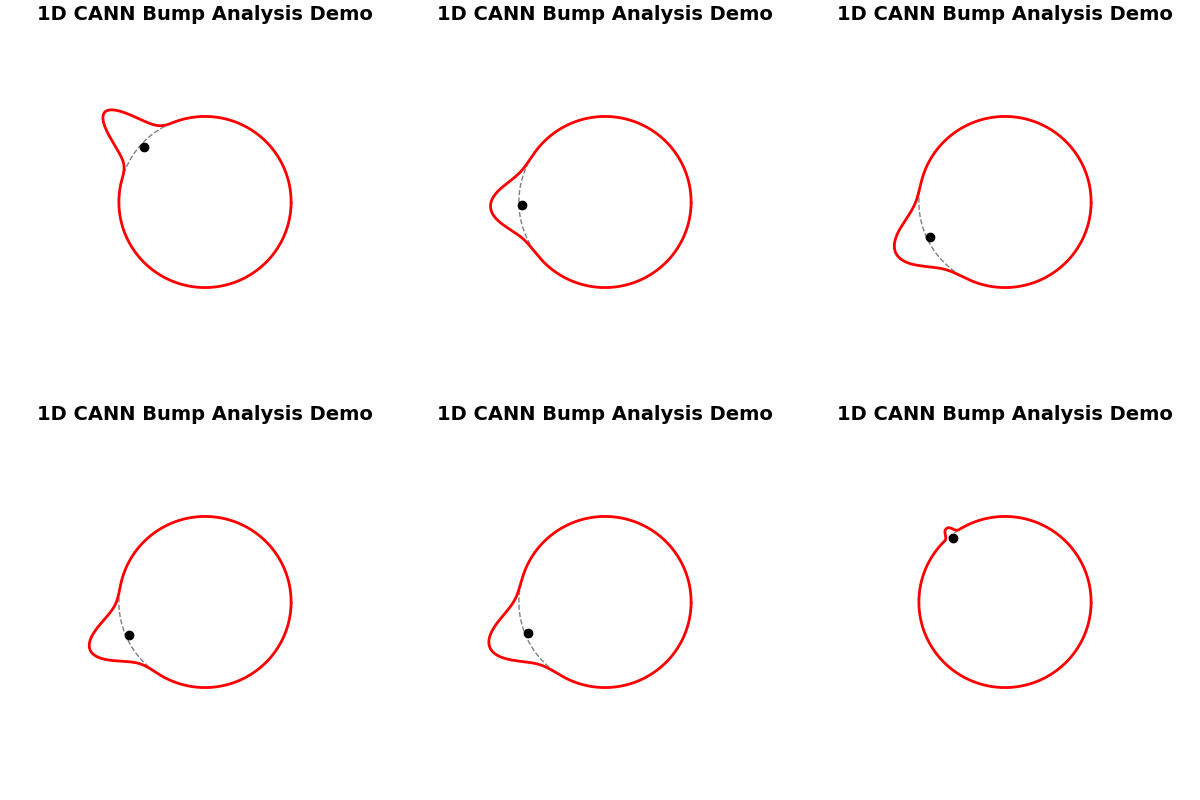
1D bump trajectory illustration (animation)
Related Example Scripts
examples/experimental_data_analysis/fly_roi_bump_fit.py